Wednesday, October 07, 2009

Santa's not the Only One

That should be making a list and checking it twice. From the DLM Blog:

How to Prioritize by Importance – And Stick to It

Posted: 04 Aug 2009 07:31 AM PDT

Is your to-do list overflowing with tasks? Do you end up rushing from one thing to the next, dealing with whatever’s most on your mind at the time – and shoving everything else aside for another day? This can be an effective way to work at times, such as when clearing the decks before vacation, but both your work and your health are likely to suffer if you’re constantly in “firefighting” mode.

So how can you start concentration on what really matters, instead of on what seems most pressing?

The Four Quadrants

There’s a useful technique in time-management that involves dividing your tasks into a grid with four “quadrants”, which are:
  • Urgent and Important (eg. “My big report is due in three hours”)

  • Important but Not Urgent (eg. “I’m delivering a presentation next month”)

  • Urgent but Not Important (eg. “My library books are due back today”)

  • Not Important and Not Urgent (eg. “I’m watching YouTube clips”)
What Goes Where?
Generally, it’s not too hard to decide where a particular task or activity fits. The key is not to confuse a task’s urgency with its importance. For example, it might be annoying to be fined $2 for your library books being overdue, but it’s not really an important consequence in the grand scheme of things. On the other hand, missing the deadline with your big report might have huge negative consequences on your career.

“Important but Not Urgent” – The Crucial Things We Put Off
The category that time management experts recommend you concentrate on is the “Important but Not Urgent” tasks. Usually, items in this quadrant will become urgent if you leave them too long. For example:
  • That presentation due in three months will be looking pretty urgent in two months and twenty nine days...

  • Taking care of your health (eg. with exercise and good diet) might become urgent ten years down the line, when you get sick

  • Sorting out your taxes will become urgent once the deadline’s imminent
Have a think about your own life. I’m willing to bet that there’s been a time when you put off something “Important but Not Urgent” ... and ended up under a lot of stress because it did become urgent. This might have been anything from a term paper in college to an overdue trip to the dentist.

Why We React to “Urgent”
Most of us have a tendency to react, in almost a knee-jerk way, to things that are urgent. This is a good survival technique (after all, if a saber-tooth tiger is about to eat you, you’d want to leave off inventing the wheel and run away...) Often, though, it leads to a very ineffective way of working: we deal with things in a panic, procrastinate over anything that isn’t urgent, and end up creating a lot of stress for ourselves whilst not really accomplishing much.

Focusing on “Important”
So how can you draw your focus back to the stuff that matters? How can you make sure you’re working on what’s truly important before it becomes urgent?

I’d suggest a few simple things:
  • Get rid of your “not urgent and not important” activities. (Note – that doesn’t mean get rid of things that relax and recharge you: they are important.)

  • Make sure that “urgent and not important” activities never get in the way of “important and not urgent” ones. Frankly, it’s probably better for you to work on your dissertation for two hours, instead of spending that time racing across town with your soon-to-be-overdue library books.

  • Remember that “important” is a matter of perspective. Be honest with yourself about what’s important to you. Important tasks are ones which enrich your life: they don’t have to be ones that involve making money or advancing your career.

  • Start off your day with an “important and not urgent” task. This might be writing a chapter of your novel, getting some exercise, sorting out your tax return, learning a new language... as per the previous point, you define what’s important to you.
Do you find that you end up spending most of your day on “urgent” – or on time wasters? How do you keep your focus on what really matters in your work and your life?

Written on 8/04/2009 by Ali Hale. Ali is a professional writer and blogger, and a part-time postgraduate student of creative writing. If you need a hand with any sort of written project, drop her a line (ali@aliventures.com) or check out her website at Aliventures.Photo Credit: ➨ Redvers

Fort Wayne Site-of-the-Day


It's this Saturday and I'll be there in the afternoon with ROCK 104. Click here for the details.

Tuesday, October 06, 2009

Not a Techie... But


Nope, not me.

I'm mostly self-taught when it comes to computers and software and the internet.

And I proved it to myself in the past 24 hours.

Around 3:something Monday afternoon, I'm noticing problems with my Microsoft Outlook not sending emails. So, I searched online for a solution and ended up with a computer that would not connect to the internet.

I spent at least 6 hours on Monday night and another couple hours this morning trying different things until I found the solution. It wasn't found directly online, but I figured it out anyway.

Oh, and I lost my cellphone yesterday afternoon too, but found it this morning.

Fortunately you don't have to be a techie to do social media and marketing. Friday morning in Fort Wayne, I am presenting a seminar:

Join the Conversation! Social Media & Marketing


Friday, October 9, 2009 - 7:30 AM to 9:00 AM

Find out what the Social Media Craze is all about, where it came from, what’s going on, and where it’s going!

So, you’ve heard about words like
Social Media, Social Marketing, Facebook, Twitter, Blogs, and you’re wondering,
“ What’s this all about?” “Is this just a fad?” “It’s just for kids?” or perhaps, “It all sounds pretty stupid and a waste of time!”

No matter what you are thinking, people are talking about you, your business, your competitors, and you need to join the conversation.

Find out what the Social Media Craze is all about, where it came from, what’s going on, and where it’s going.

You’ll discover the power of communication that can keep you in touch with your current, former, and prospective customers.

About Our Speaker

Scott Howard is the founder of ScLoHo Marketing Solutions based in Fort Wayne, Indiana. Since 1986, he has created advertising and marketing campaigns using radio, print, direct mail, and a multitude of internet based media and marketing options.

Since 2003, he has been with Summit City Radio as a Senior Sales Executive, Station Manager, Teacher, Trainer and Mentor.

Scott writes, edits and publishes 5 blogs including 2 on Marketing, Advertising and Sales:

ScLoHo’s Collective Wisdom (http://sclohonet.blogspot.com/) is updated 25 to 30 times each week with sales training tips, marketing and advertising news and social media information.

The Not-So-Secret Writings of ScLoHo (http://sclohonet-thebook.blogspot.com/) is updated weekly. If Scott were to take the time to write a book on marketing, these would be the chapters!

Scott was recently asked to write a piece on Marketing and Advertising for the Fort Wayne Chamber of Commerce Emphasis newsletter, which was published and distributed in the Greater Fort Wayne Business Weekly August 21, 2009.

Services provided by ScLoHo Marketing Solutions include:
-Internet and Social Media Services
-Marketing Plan Consulting and Implementation
-Radio and Specialized Print Advertising Options
-Personalized Sales Training and Coaching

Scott serves on the Board of Directors of the American Advertising Federation of Fort Wayne as the Vice President of Membership.

Specifics

Who Should Attend: Anyone wondering what Social Media is... if it can help your business ... and why you might want to participate in it!
Where: TQM Network Learning Center - Leadership & Learning Center
Directions: The TQM Network Learning Center is located 825 Barr Street. Parking is available at meters surrounding the building or the parking garage on the corner of Wayne & Barr. Some limited free parking is available on the side of the building.

The event will be held in the Lower Level Conference Room.
Speaker/Instructor Scott Howard, ScLoHo
Cost: $100 for non-members.
No cost for members.
Registration: You may register online at www.tqmnet.com. Click on the 'Register Now!' button. You may also send an email to register@tqmnet.com, or call Jamie at 260-557-7665.
Deadline: Please register as early as possible, but not later than 10/8/2009.


I have a limited number of guest passes. Email me at Scott @ ScLoHo.net with the subject line Seminar and I'll tell you how to get in free, if I have any left.

Fort Wayne Site-of-the-Day


Click here to go there!

Monday, October 05, 2009

A better way to Google It

Last week I featured some G-mail Tips.

Today, let's learn how to Google and get better search results.

From the DLM Blog:

20 Tips for More Efficient Google Searches

Posted: 03 Oct 2009 08:35 AM PDT

For millions of people Google is an indispensable search tool that they use every day, in all facets of their lives. From work or school, research, to looking up movies and celebrities to news and gossip, Google is the go-to search engine.

But instead of just typing in a phrase and wading through page after page of results, there are a number of ways to make your searches more efficient.

Some of these are obvious ones, that you probably know about. But others are lesser-known, and others are known but not often used. Use this guide to learn more about, or be reminded of, some of the best ways to get exactly what you're looking for, and quickly.
  1. Either/or
    Google normally searches for pages that contain all the words you type in the search box, but if you want pages that have one term or another (or both), use the OR operator -- or use the "|" symbol (pipe symbol) to save you a keystroke. [dumb | little | man]

  2. Quotes
    If you want to search for an exact phrase, use quotes. ["dumb little man"] will only find that exact phrase. [dumb "little man"] will find pages that contain the word dumb and the exact phrase "little man".

  3. Not
    If you don't want a term or phrase, use the "-" symbol. [-dumb little man] will return pages that contain "little" and "man" but that don't contain "dumb".

  4. Similar terms
    Use the "~" symbol to return similar terms. [~dumb little man -dumb] will get you pages that contain "funny little man" and "stupid little man" but not "dumb little man".

  5. Wildcard
    The "*" symbol is a wildcard. This is useful if you're trying to find the lyrics to a song, but can't remember the exact lyrics. [can't * me love lyrics] will return the Beatles song you're looking for. It's also useful for finding stuff only in certain domains, such as
    educational information: ["dumb little man" research *.edu].

  6. Advanced search
    If you can't remember any of these operators, you can always use Google's advanced search.

  7. Definitions
    Use the "define:" operator to get a quick definition. [define:dumb] will give you a whole host of definitions from different sources, with links.

  8. Calculator
    One of the handiest uses of Google, type in a quick calculation in the search box and get an answer. It's faster than calling up your computer's calculator in most cases. Use the +, -, *, / symbols and parentheses to do a simple equation.

  9. Numrange
    This little-known feature searches for a range of numbers. For example, ["best books 2002..2007] will return lists of best books for each of the years from 2002 to 2007 (note the two periods between the two numbers).

  10. Site-specific
    Use the "site:" operator to search only within a certain website. [site:dumblittleman.com leo] will search for the term "leo" only within this blog.

  11. Backlinks
    The "link:" operator will find pages that link to a specific URL. You can use this not only for a main URL but even to a specific page. Not all links to an URL are listed, however.

  12. Vertical search
    Instead of searching for a term across all pages on the web, search within a specialized field. Google has a number of specific searches, allowing you to search within blogs, news, books, and much more:
  13. Movies
    Use the "movie:" operator to search for a movie title along with either a zip code or U.S. city and state to get a list of movie theaters in the area and show times.

  14. Music
    The "music:" operator returns content related to music only.

  15. Unit converter
    Use Google for a quick conversion, from yards to meters for example, or different currency: [12 meters in yards]

  16. Types of numbers
    Google algorithms can recognize patterns in numbers you enter, so you can search for:

    • Telephone area codes
    • Vehicle ID number (US only)
    • Federal Communications Commission (FCC) equipment numbers (US only)
    • UPC codes
    • Federal Aviation Administration (FAA) airplane registration number (US only)
    • Patent numbers (US only)
    • Even stock quotes (using the stock symbol) or a weather forecast regarding the next five days
  17. File types
    If you just want to search for .PDF files, or Word documents, or Excel spreadsheets, for example, use the "filetype:" operator.

  18. Location of term
    By default, Google searches for your term throughout a web page. But if you just want it to search certain locations, you can use operators such as "inurl:", "intitle:", "intext:", and "inanchor:". Those search for a term only within the URL, the title,
    the body text, and the anchor text (the text used to describe a link).

  19. Cached pages
    Looking for a version of a page the Google stores on its own servers? This can help with outdated or update pages. Use the "cached:" operator.

  20. Answer to life, the universe, and everything
    Search for that phrase, in lower case, and Google will give you the answer.
For more on Google's search syntax, see this guide, and this one.

Written for Dumblittleman.com on 06/07/2007 by Leo Babauta and republished on 10/3/09. Leo offers advice on living life productively simple at his famous Zen Habits blog.Photo Credit: manfrys

Fort Wayne Site-of-the-Day


Click here to go there

Sunday, October 04, 2009

Make a Plan

Feeling lost and wondering what to do next?

5 Practical Keys to Living The Life of Your Dreams

Posted: 21 Sep 2009 08:56 AM PDT

I’ve spent most of my life studying success. I’ve always been intrigued by what causes one person to succeed and another to fail. Why does one person become rich, while another person seems doomed to a life of poverty? Is it due to where they were born, or the social status of their parents, or the academic education they received?

Yes, these external situations are indeed factors, but they are not the cause of success. The real source of success comes from following the principles of success; principles that work for all alike. If you follow the principles, your bettering your odds of success!

I’ve studied these principles over the last 15 years. From this study I’ve come up with five keys that are necessary for you to live the life of your dreams. This article recaps those five keys. Read them, study them, and then put them into action; soon you to will be living the life of your dreams:

Key Number 1: A Plan

“Have a plan. Follow the plan, and you will be surprised how successful you can be. Most people don't have a plan. That's why it's easy to beat most folks.” - Paul "Bear" Bryant, University of Alabama's Crimson Tide Football Coach

In order to live the life of your dreams you must have a written plan as to how you will get from where you are to where you want to be. If you have no plan, you will fail, and you can quote me.

A plan is a map which will guide you to your destination, without one, you’re lost, and you’ll never find your dream. Thane Yost said, the will to win is worthless if you do not have the will to prepare.

So develop a plan today.

Key Number 2: Passion

“Nothing great in the world has ever been accomplished without passion.” - Hebbel, German Poet and Dramatist

If reaching your dream is a road trip, then passion is the fuel that will get you there. You must determine what your passion is, and you must dedicate your life to living your passion, if you want to live your dream. You will never be truly happy if you’re not doing what you’re most passionate about. If you love to sing, then you must sing, if you love to dance, then you must dance, and if you love to paint, then you must paint.

Your passion will give you the ability to overcome the obstacles associated with achieving your dreams. Nothing worth achieving is going to be easy; passion gives you the strength to go through the pain of failure until you arrive at your dream.

So if you’re planning on doing the impossible, make sure your plan includes your passion. One of my favorite quotes is by an unknown author and it goes, “Above all, be true to yourself, and if you cannot put your heart in it, take yourself out of it.”

Key Number 3: Action

Great it is, to dream a dream,
when you stand at youth, by a starry stream,
but a greater thing, is to fight life through,
and say at the end, the dream is true. - Poet Unknown

For every dream accomplished, there is a story. A story of sweat, blood and tears; if you’re going to achieve your dreams, you’re going to have to give your all.

You must become consumed by the dream. You must see it, think it and do it. I like what Mario Andretti the race car driver said, he said, “If things seem under control, you’re just not going fast enough.” That’s what I’m saying to you, if things aren’t just a little chaotic, you’re not moving fast enough toward your dreams. As the saying goes, you can’t stroll to a goal.

Glade Byron Adams said, “Chase down your passion like it’s the last bus of the night.” That’s the determination and persistence that’s necessary for you to live your dream.

Remember there are no short cuts to success; we must all take the same road.

Key Number 4: Faith

“Whether you believe you can do a thing or not, you are right.” - Henry Ford, Founder of the Ford Motor Company

Your beliefs determine your actions. If you don’t believe you can succeed, then you won’t take the actions necessary to succeed. If you believe you can succeed, then you will take the actions to succeed, and you will succeed; it’s that simple.

Faith in your limitless ability is required for you to live the life of your dreams. I think if anyone can succeed, then everyone can succeed. You were born to be a success, as cliché as that sounds, it’s the absolute truth. Walt Disney said if you can dream it, you can do it.

Key Number 5: Teamwork

“Teamwork is the fuel that allows common people to attain uncommon results.” - Author Unknown

The song is true, “Everybody needs somebody.” In order to live the life of your dreams you need a team. It may be your spouse, it may be your business partners, it may be your mentors, it may be your family, but everyone needs someone to support them and help them along the way.

Don’t try to do it alone, because you can’t. Learn to lean on others for wisdom, advice, counseling and support, and be sure to reciprocate the same.

We’re all connected and we need each other, if I write, then I need you to read. If you sing, then you need me to listen.

In closing, go after your dreams, not because they’re easy to attain, go after your dreams because you deserve to live the life of your dreams.

Written on 9/21/2009 by Mr. Self Development who is a motivational author that offers a practical guide to success and wealth; support him by visiting his blog at mrselfdevelopment.com. .Photo Credit: Y

Fort Wayne Site-of-the-Day


Click here to go there

Saturday, October 03, 2009

Saturday Night Classic Music Video

Another tune to crank up real loud!

Fort Wayne Site-of-the-Day


Click here to go there

Friday, October 02, 2009

Hammer Time

I own a nice big red Craftsman toolbox on wheels. I used to use it at work when I was a thermoformer operator which I did for a couple of years as a break from the advertising and marketing world.

I know the importance of using the right tools whenever possible and one of those tools is a hammer. This bit of wisdom comes from the AOM blog...

Toolmanship Basics: How to Handle a Hammer

Posted: 29 Sep 2009 07:57 PM PDT
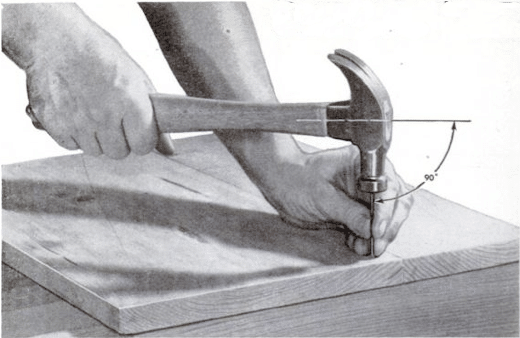
hammering

A lot of men today are clueless when it comes to tools. The increased affluence of the past 50 years led many men to outsource handyman work instead of doing repairs and home improvement themselves. And let’s face it. Men today can be pretty darn lazy. They’d rather play their Xboxes than work on building something with their own bare hands.

But knowing how to handle tools is an essential skill every man should, well, have a handle on. You’ll become more self-reliant, you’ll save money, and you’ll enjoy the supremely manly satisfaction of working with your hands. To help the generation of men who never got around to learning how to use tools, we’ll be doing a series of posts on basic toolmanship.

To kick off our series on tool use, we start with the lowly hammer. To the unskilled, hammering just means pounding the hell out of something until you get the job done. Sure, you could do that, but you’ll end up with crummy results and a tired arm to boot. A wise handyman knows how to use a hammer safely, effectively, and efficiently.

Types of Hammers

Proper hammering begins with selecting the right hammer for the job. Using a hammer for tasks that it’s not suited for can result in injury and shoddy work. Below, we give you the skinny on the different types of hammers a man has to choose from.
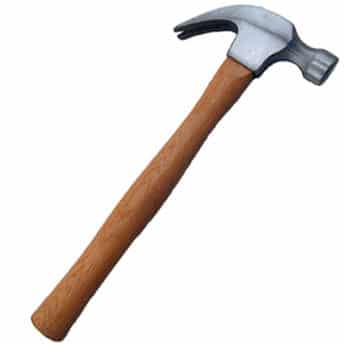
claw

16 ounce claw hammer. If you’ve only used one kind of hammer in your life, it’s probably this one. Its curved back makes it ideal for pulling out nails. This is a must for any man’s toolbox.
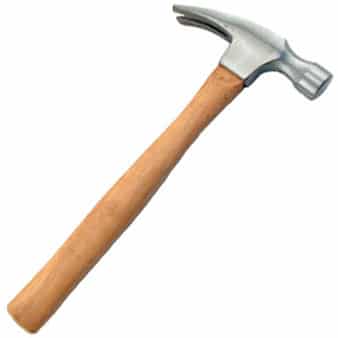
rip_hammer

16 ounce ripping hammer. When you have a small demolition job, this is your go-to hammer. Unlike the claw hammer, the back of a ripping hammer is straight. It’s used for heavy carpentry work, framing houses, and of course, ripping crap up.
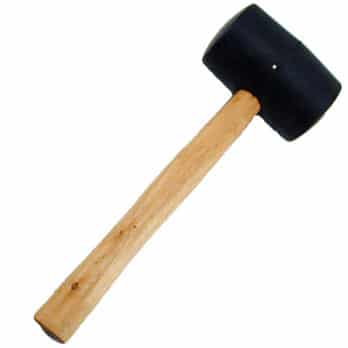
mallet

Rubber mallet. Use a rubber mallet when you hammer a finished-metal surface.
wooden_mallet

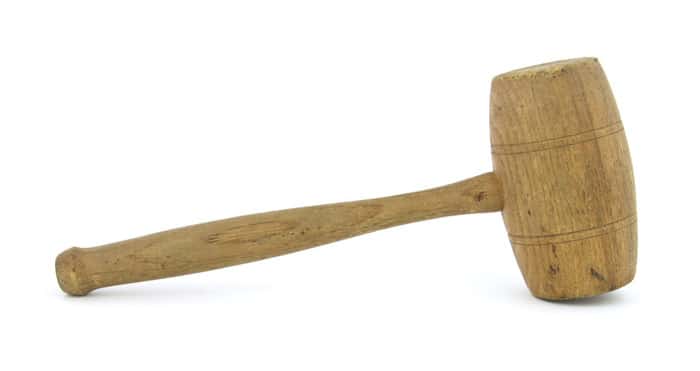
Wooden mallet. Carpenters use wooden mallets to strike wood chisels during carpentry work. Don’t try drywalling with a wooden mallet. You’ll just end up with a bunch of splinters in your face after the head smashes into a million pieces.
soft_face_hammer

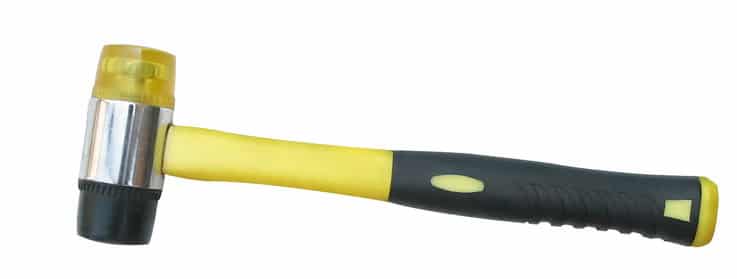
Soft-face hammer. When assembling furniture or working on some other decorative wood project, you need a hammer that will drive a nail without marring the surface of the wood. Go with the soft-face hammer for this job. The faces of soft-face hammers are usually made of plastic or rubber.
Ball Pein Hammers

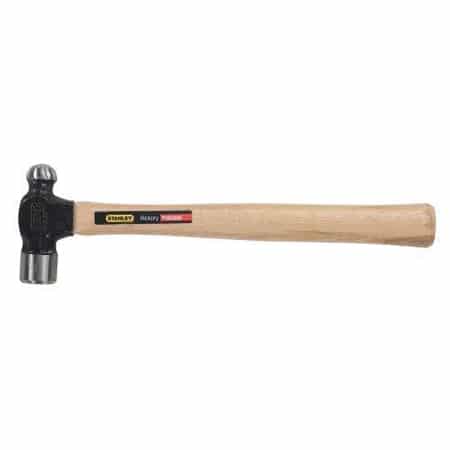
Ball peen hammer. Ball peen hammers are used in metalworking tasks like center punching and shaping soft metal.
masons_hammer

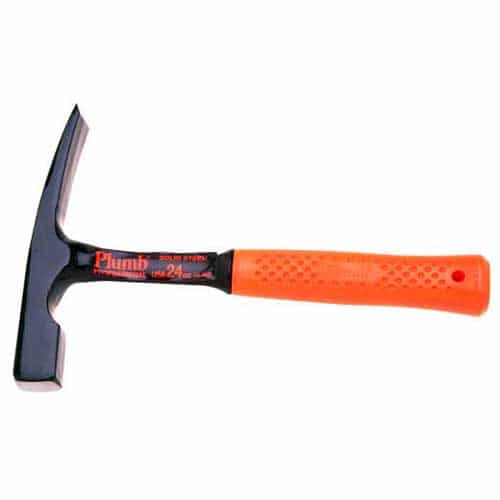
Mason’s hammer. Use a mason’s hammer to cut and set bricks when laying that new walkway.
tack

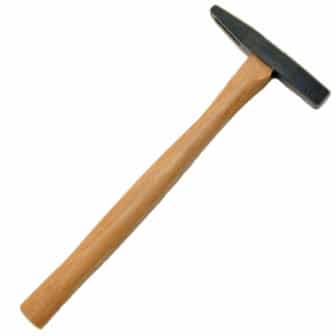
Upholster’s or tack hammer. The smaller face is designed for driving tacks in upholstery work.
dry_wall

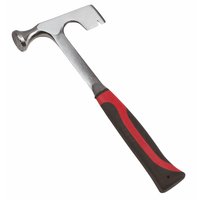
Drywall hammer. The serrated face of this appropriately named hammer gives you a better grip on the nail when installing drywall. You can use its hatchet-shaped back for cutting drywall.
sledge_hammer

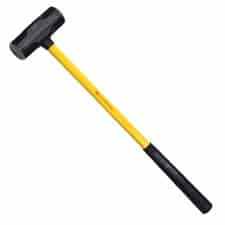
Huge ass sledge hammer.For big demolition jobs, bring out the big guns. Concrete, walls, and porecelin bathtubs are no match for a 10 pound sledge hammer. It also comes in handy at state fairs when attempting to win your girl a giant teddy bear.

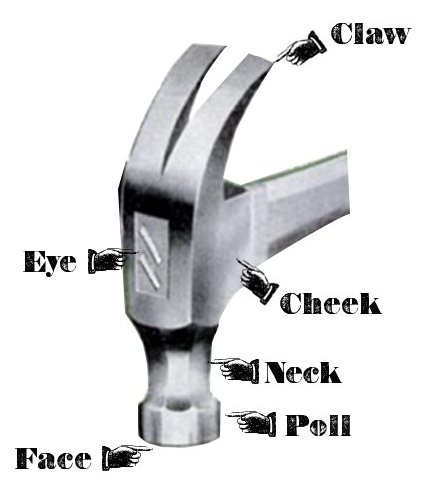
Parts of a Hammer
hammerparts

Hammer Safety

Use the right hammer for the job. Don’t upholster a couch with a sledge hammer or drive drywall nails with a tack hammer. You won’t get the job done right, and you might end up injuring yourself.

Don’t strike a hardened steel surface with a steel claw hammer. Flying metal chips can injure you or a bystander.

Never use a hammer with a loose or broken handle. The hammer head could come flying off while in use. If you don’t want to explain to your wife why grandma’s china cabinet is in a million pieces, replace the handle if it’s loose or cracked.

Never use a hammer with a chipped or cracked head. It’s an accident waiting to happen.

How to Handle a Hammer

Where to hold the hammer. Hold the hammer like you’re shaking hands with somebody. When you need more control over the hammer, like when you’re starting a nail, grip the hammer closer to the hammer head. When you need power, grip the hammer near the handle’s end.

Starting the nail. Place the nail where you want to drive it and hold it between the thumb and forefinger of your non-dominant hand. Place your fingers near the top of the nail when holding it. If you hold the nail near the bottom, a missed hammer swing will crush your fingers between the wood and the hammer. Not a pleasant feeling.

Grip the hammer near the middle of the handle. Tap the nail lightly until the nail has sunk into the wood enough that it can stand on its own.

If you’re driving in nails that are too small to hold between your thumb and forefinger, use this handyman tip: Grab a piece of thin cardboard or thick paper and push the nail through it. Instead of holding onto the nail, you hold onto the cardboard. Remove the cardboard before you finish driving the nail.

For some hardwoods, it’s a good idea to drill a pilot hole before you hammer in a nail. It makes the job easier and prevents the wood from splitting. Which brings us to our next point-

Preventing wood splitting. In addition to creating a pilot hole, lubricating the nail with beeswax and blunting the nail will also keep the wood from splitting. To blunt a nail, simply tap the nail point with your hammer. Also, avoid hammering a nail into the grain of the wood.

Swing from the elbow for power; swing from the wrist for control. For maximum power and efficiency, swing from the elbow. When you need more control and finesse, swing from the wrist. Many hammer newbies try to hammer with just wrist action.

Focus on the nail, not the hammer. When hammering, you want to avoid sideways and glancing blows. To score a direct hit every time, focus on the nail head, not the hammer.

Let the weight of the hammer do the majority of the work. You don’t need to use every ounce of strength in your body when hammering. That will only lead to wild swings and bent nails. The weight of the hammer head plus your smooth swing provides enough force to get the job done.

Advanced Hammering Techniques

Clinching nails. Let’s say you drive a nail through a 2×4. The nail is longer than the board is thick, so when you drive in the nail, the nail’s point sticks through the board. You don’t want to leave those points hanging out to snag people’s clothing or scrape their skin. So you’ll want to clinch the nail. Simply strike the tip of the nail at an angle and force it down flat into the board with light taps. Sink the tip below the surface of the board with a sharp rap. When you clinch a nail, always clinch with the grain. In addition to preventing ripped shirts, clinching also lends a nail greater strength and stability.
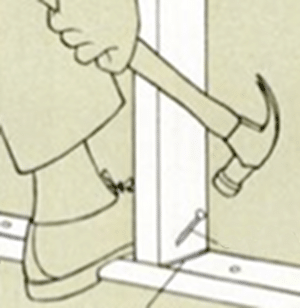
toenailingExample of toenailing

Toenailing. When you need to nail one board perpendicular to another, like in a framing job, bust out the toenail technique. Toenailing involves driving a nail at an angle through the end of the board to anchor it to another board. To toenail, place one end of the board perpendicular to the board you want to nail it to. Drive the nail in at a 60 degree angle. It can be tricky starting an nail at an angle, so begin by making a pilot hole by tapping the nail point straight into the board. Once you have a hole, tip the nail point to the correct angle to finish driving it in. Brace your foot behind the board as you hammer, so the board doesn’t move from its spot. Toenail a second nail on the same side and two more nails on the opposite side.

Removing Nails

Claw hammers are designed to remove nails. Simply slide the claw underneath the nail head. Pull the hammer’s handle towards you to extract the nail. Here’s an old trick from grandpa to help you pull nails: Stop the first pull back before the hammer’s poll touches the surface of the wood. Place a wood block under the hammer head to provide some leverage. Using the block puts less strain on the hammer’s handle and allows you to lift the nail straight up without bending it.
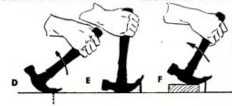
pulling nailPlace a block under the hammer after the first pull back


Some nail heads are too small for the tongs of the hammer to grasp. To deal with such nails, hammers are sometimes made with a small v-shaped notch in one of the prongs. If yours lacks this feature, you can simply file a v-shaped notch into one of the claws with a metal file.

Fort Wayne Site-of-the-Day


For the past week I have been featuring websites that were sent to me by a friend of mine, Tom Carroll.

Now it's his turn.

Click here to go there.

Thursday, October 01, 2009

Gmail Tips

Before I share with you the article I found last month on the DLM Blog, I'll share with you why I made the switch a few years ago.

When I first became active online, Gmail wasn't around. And then it was by invite only!

So I had free email accounts with Yahoo and Microsoft (HotMail).

When I set up my first customized domain name it was also with Yahoo. I was a strong advocate of Yahoo products.

Then, the longer I had an email address, the more cluttered with spam it became. Today estimates are that over 90% of email is spam. And Yahoo couldn't handle it. The Yahoo spam filters were catching some, but not all of the spam.

When it became overwhelming to clean out my Yahoo email every day, I began using a gmail account that I reserved and at first simply used it as a spam filter. Now with the added features that Google has added to their email program, I can send all my email into my Gmail account and all of it gets filtered!

Read more:

6 Smart Gmail Tricks To Help You Get The Most Out Of It

Posted: 11 Sep 2009 04:51 AM PDT

gmailI'm sure most of you would agree that Gmail has revolutionized the way we communicate and manage information via email. If you doubt it then it means that you are yet to exploit the extraordinary features of this email app to the fullest.

This article explores some of the outstanding Gmail features and tricks which make this tool a must have for anyone using email to communicate. The features discussed here will also help long time Gmail users to dig deeper and get the most out of this amazing service.
  1. Consolidate multiple email accounts into one Gmail account
    This is probably the most important reason why one should make the switch if he is using a different email service. With Gmail you don't have to worry about checking your different email accounts. You can consolidate all the multiple inboxes into one Gmail account.

    While the option to combine other email accounts into Gmail was always there, recently Gmail made the process a cakewalk by introducing the import option in the settings. It's super easy now to use Gmail as your one stop email service.

  2. Learn to use filters and labels effectively
    No other email service lets you filter and organize emails the way Gmail does. Using "Filters" and "Labels" in Gmail, you could always keep unimportant emails out of your inbox and be much more efficient in email management.

    Here is an old but still useful article from Lifehack on ways to use Gmail filters. If you are looking to learn more about labels then this article on about.com regarding Gmail labels should help you.

  3. Make use of multiple Gmail addresses you get with one account
    This is a gem. And if you didn't know about this, here's the surprise - with Gmail you actually get an unlimited number of different email addresses. Yes, unlimited! How? Well abc@gmail.com is same as a.bc@gmail.com and abc+def@gmail.com. More on this here.

    Oh, and abc@gmail.com is also same as abc@googlemail.com. Awesome feature, isn't it? This feature could be used in so many ways. Like in this article, the Digital Inspiration blog points out how you could use one email for multiple twitter accounts. That's just one use. There could be many more such tricks. Get the picture?

  4. Use Gmail Labs
    In my opinion, the next best thing the Gmail team has done after launching Gmail is introducing Gmail Labs. I wasn't gung-ho about it initially but when the different labs add-ons started rolling out, I was completely speechless. Gmail became more amazing each day.

    There are a number of Labs tools you could enable. Here are my favorite picks.

  5. Use Browser add-ons
    If Firefox is your primary browser (it should be if it isn't), then you could also install certain add-ons which add more functionality to Gmail. Here is an article which talks about some of the best add-ons for Gmail available.

  6. Make Gmail your information center
    If you were to ask me the name of one person who has exploited Gmail more than anyone else, I would instantly say Steve Rubel. The man has written some great articles on how he uses the various features of Gmail to organize information efficiently. One such article is about how he transformed Gmail into his personal nerve center. It's an excellent read.
Hope you like the tricks. If you know of some other cool ways to use Gmail, do share them in the comments.

Cheers,

Abhijeet

Written on 9/11/2009 by Abhijeet Mukherjee. Abhijeet is an internet entrepreneur who loves writing about tech, productivity, blogging & making money online. Catch him at Jeet Blog and also subscribe to his weekly newsletter.Photo Credit: Gubatron

Fort Wayne Site-of-the-Day


Click here to go there